
Product updates ·

Everything that's new in your Droovi workspace

A client portal under your brand, WhatsApp sent from your own number, automatic pricing, earnings your drivers can see… Since our May edition, we mostly worked on your client relationship and on pricing. Every feature below is already live on your account — no action needed on your side.

★ The headline features
Client portal

A client portal under your brand

Your corporate clients (hotels, agencies, companies) get their own portal, in your colours and on your own domain. They book rides, amend or cancel them, follow the driver live and download their invoices. You decide, client by client, who gets access.

Droovi for ride providers
WhatsApp

Your WhatsApp messages, from your number

Connect your own WhatsApp number by scanning a QR code from your workspace. Confirmations and "driver on the way" or "driver has arrived" messages are sent under your name. You can rewrite every message: it is translated automatically into the passenger's language.

See all features
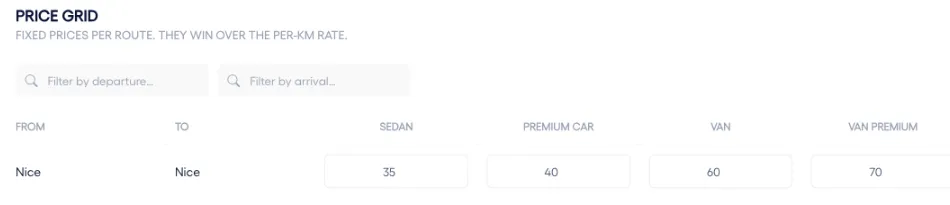
City-to-city price grid in Droovi, one price per vehicle type
Pricing

Prices that calculate themselves

Pricing zones, city-to-city grids, per-km rates, airport or date surcharges: set your rules once and the price is pre-filled on every new ride, on the web and on mobile. The full calculation is shown, so you always know where an amount comes from.

See all pricing features
Website

Your website connected to your schedule

Bookings made on your website land directly in Droovi, priced with your grid. No more re-typing, no more forgotten emails: the ride is ready to dispatch.

Discover the Droovi chauffeur website

Ride management

  • Round trips in one go

    Create the outbound and return rides together; both rides are linked.

  • Several passengers per ride

    Add extra passengers; each one can receive their confirmation by email.

  • Saved addresses

    Pick each passenger's usual addresses in one click.

  • Pickup assistance and luggage

    Add an on-site contact and the number of bags: the driver sees them on the ride.

  • Booking voucher under your name, in the client’s language

    The voucher carries your identity (no longer Droovi’s), is sent in the language set for each client, and can be resent in one click from the ride.

  • Bulk ride completion

    Select every ride to complete, even across several pages, and close them all at once with the completion reason.

  • Built-in "To accept" tab

    Rides to accept now sit in the transfers list. Passenger contact details stay hidden until the ride is accepted.

  • Readable change history

    Who changed what, and when: each ride’s history is shown in plain language.

  • Your vehicle types

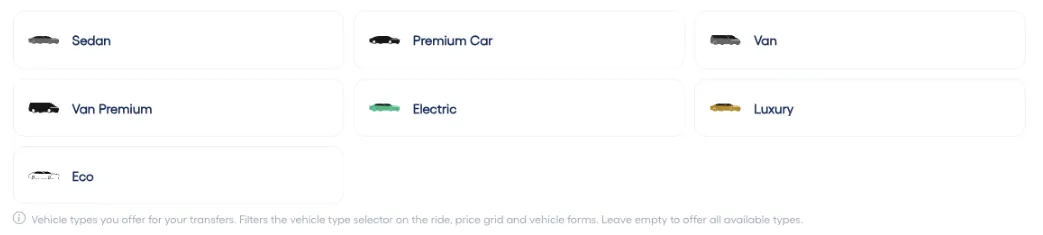
    Choose the vehicle classes you offer: only those appear when creating a ride.

    Choosing the vehicle types offered in the company settings

Pricing and invoicing

  • Pricing zones and per-km rate

    Price by zone, by client, or fall back on your default per-km rate when no grid matches.

  • Excel or CSV grid import

    Import your city-to-city routes in one go, one price per vehicle type, from a sample file.

  • Airport and date surcharges

    Add a surcharge on airport pickups or on specific periods (holidays, trade fairs, peak season).

  • Price calculation explained

    Grid used, kilometres, percentage, VAT: every amount shows where it comes from on the ride.

  • Invoicing in your currency

    All amounts and invoices are shown in your company’s currency.

  • Configurable VAT rate

    Set your VAT rate in your company settings; it applies everywhere.

  • Signed receipts attached to invoices

    Rides signed by the passenger are attached to the client invoice, with the vehicle type in the appendix.

  • Invoices that are easier to check

    Each ride’s status on the invoice, filters that stay in place, and no more empty invoices in months without activity.

Subcontracting and marketplace

  • Subcontractor creation wizard

    Add a subcontractor step by step, with their manager and full contact details.

  • Subcontractor price list

    What you pay your subcontractors now has its own price list, separate from what you charge your clients. The price is recalculated whenever the partner changes, with their VAT.

  • Targeted publishing

    Pick one clear channel for a ride: your network, the marketplace or a driver link — no risk of duplicates.

  • A clearer marketplace

    Vehicle type shown and filterable, airport arrival or departure indicated, and a notification when rides are waiting to be taken.

Passenger and client communication

  • Automatic WhatsApp voucher

    The passenger receives their booking voucher on WhatsApp at confirmation, then the driver details once assigned.

  • "Driver has arrived" message

    The passenger is notified as soon as the driver is waiting at the pickup point.

  • Customisable messages

    In Settings › Notifications, switch each message on and write your own text, translated automatically.

  • WhatsApp disconnection alert

    You get an email if your number disconnects, so no message is ever lost.

  • Booking confirmation to your client

    Your corporate client receives an email for every ride created, and you are notified when they book themselves.

Driver app v2.6

  • "My earnings" screen

    Drivers track what they earned per period. If you allow it, they also see the price paid by the passenger.

  • Name sign with your logo

    The welcome sign shown by the driver carries your company logo.

  • Arrival message to the passenger

    In one tap, the driver notifies the passenger by SMS or WhatsApp, or calls them through WhatsApp.

  • Automatic pricing and voucher sharing

    The price is pre-filled when creating a ride on mobile, and the booking voucher can be shared via WhatsApp or SMS.

  • Hand over a ride in one tap

    Marketplace or external driver link: a single action to pass the ride to a partner.

  • "To complete" rides

    One button gathers the rides left to close, with a mandatory completion reason.

  • Manage from your phone

    For managers: revenue for the period, client management and the subcontractor price entered at assignment.

  • Compliant proof of booking

    The chauffeur licence number and the vehicle make appear on the document shown during inspections.

  • Easier every day

    Remembered login ID, faster updates, and a reminder when background location is turned off.

Driver Event Link

  • No-show with photo proof

    External drivers using a link can also report an absent client with timestamped, geolocated photos.

  • Proof of booking at hand

    The driver opens the booking document directly from the link.

  • Driver identity visible

    The name of the driver who accepted through the link appears in your transfers list.

Integrations and compliance

  • Partner API and API keys

    Create API keys to receive bookings from your partners, with a test key to validate the integration.

  • Registro VTC in Spain

    For Spanish companies: communications to the VTC registry are sent automatically for every ride.

  • EVTC number

    Enter your French chauffeur registry number: it is carried over automatically to the driver app.

Running your business

  • Dashboard per client

    Airport arrivals and departures, cancellations: follow each client’s activity in detail, with totals.

  • Driver rates

    Set a default pay percentage for your drivers, applied when no specific rate exists.

  • A faster interface

    Lighter pages and lists that show up instantly when you come back to them.

Everything is already live on your account

Log in to discover these new features. A question, a demo? Our team is here to help.

No account yet? Create my free account