
A booking widget on your website, connected to your dispatch
Set the widget up in Droovi, copy one line of code and paste it on your website. Your clients book their ride at your prices, and it lands straight in your Droovi account. Both the passenger and your company get a confirmation email. The widget extends the Droovi private hire software: each booking then follows the same flow as the rest of your rides.
No website yet? We build you a chauffeur website with the widget built in.
The widget exactly as your clients will see it
This form is not a mockup. It is the booking widget from our demo account, embedded on this page with the same code you will paste on your own site.
<iframe src="https://book.droovi.com/demo-droovi?lang=en" width="100%" height="720" style="border:0" loading="lazy" title="Booking"></iframe>- Pickup, destination and stops with address autocomplete
- One way, return trip or hourly hire
- Passengers and luggage taken into account to offer the right vehicle
- Prices shown before any contact details are asked for
On your site, the widget shows your colours, your vehicles and your prices.
Your website brings in clients, but it does not take bookings
Most chauffeur company websites stop at a contact form or a phone number. The client has to wait, and you have to type everything in again.
The client waits for your quote
They fill in a form, you reply an hour later with a price. By then they have booked elsewhere, especially when they need an airport transfer in the evening or at the weekend.
You re-enter every request
The request arrives by email. You copy the addresses, the time, the flight and the number of passengers into your system, with a chance of a mistake every time.
Every price becomes a negotiation
With no price on display, each request turns into a back-and-forth. You spend time on enquiries that never turn into rides.
Platforms take their cut
To be bookable online, you go through middlemen who set the prices and take a commission on every ride, even when the client may have found you directly.
Live in four steps, no developer needed
Everything is set up from your Droovi account. We host the widget, so there is nothing to install on your server.
Turn on the widget
In Droovi, open the Booking widget screen and choose the widget's address, for example book.droovi.com/your-company.
Set your options
Client for the rides, payment method, vehicles offered, languages, colour, minimum booking notice, link to your terms and conditions. The preview updates alongside.
Copy the code
The "Code to copy" block gives you a ready-to-paste line in the language of your choice. One click on "Copy code" and you're done.
Paste it on your site
WordPress, Wix, Webflow, Squarespace or a custom site: paste the code into an HTML block on the page you want. Bookings start arriving in Droovi straight away.
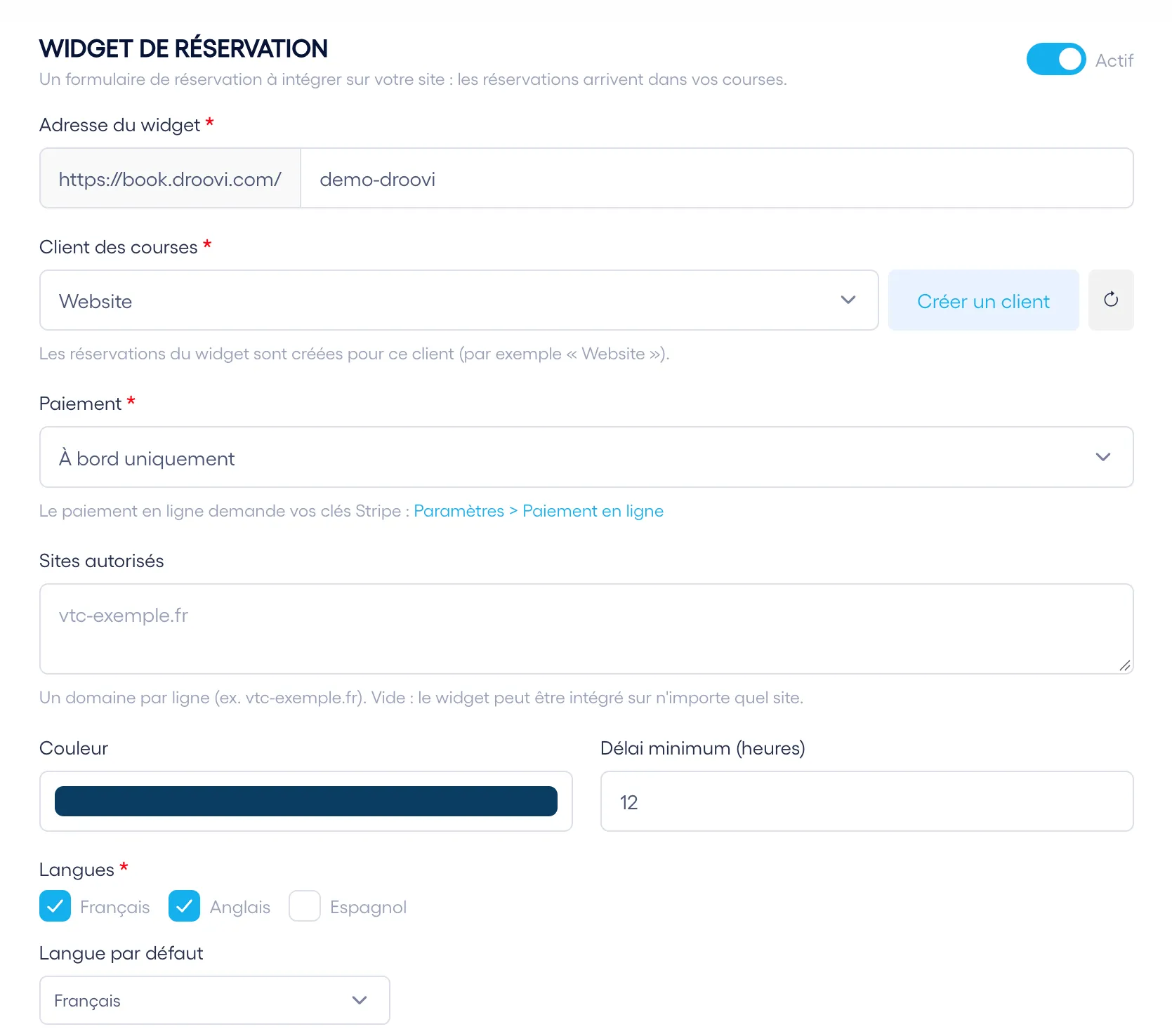
The widget is set up on a single screen
These are real Droovi screens, the ones you will use to configure your widget.
Your booking rules
You choose which client the rides are created under (for example "Website"), the payment method, the sites allowed to display the widget, its colour and the minimum notice before a pickup.
- All bookings grouped under a dedicated client
- Payment on board, online or at the passenger’s choice
- Widget restricted to your own domains if you wish
- Minimum notice in hours: no bookings for 20 minutes from now
- French, English and Spanish, with a default language
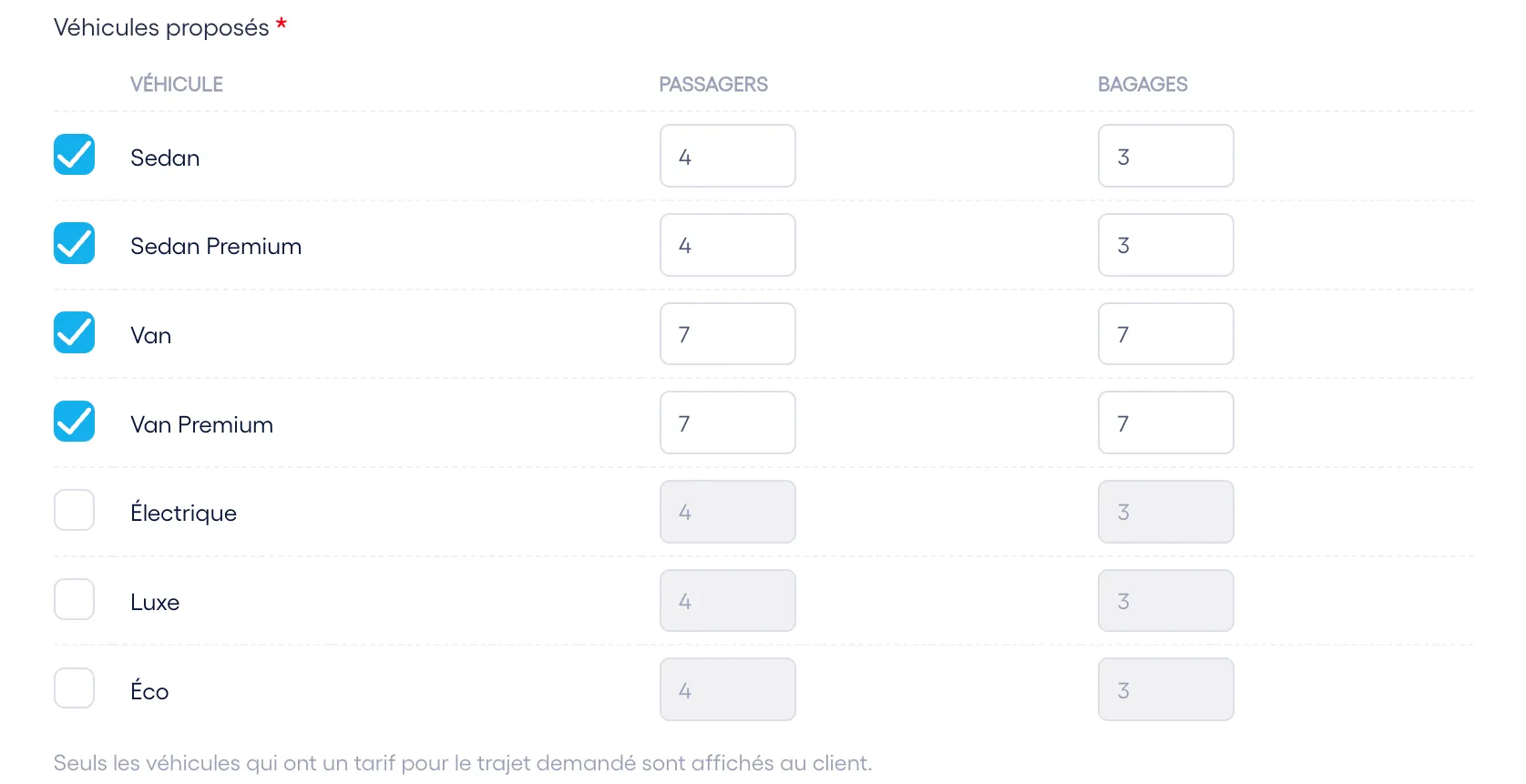
The vehicles you offer
Tick the categories to display and set their passenger and luggage capacity. The widget only offers vehicles that have a price for the requested journey and enough seats for the group.
- Sedan, premium sedan, van, premium van, electric, luxury, eco
- Passenger and luggage capacity set per category
- Prices calculated from your Droovi rate cards
- No price for this journey: your phone number is shown instead
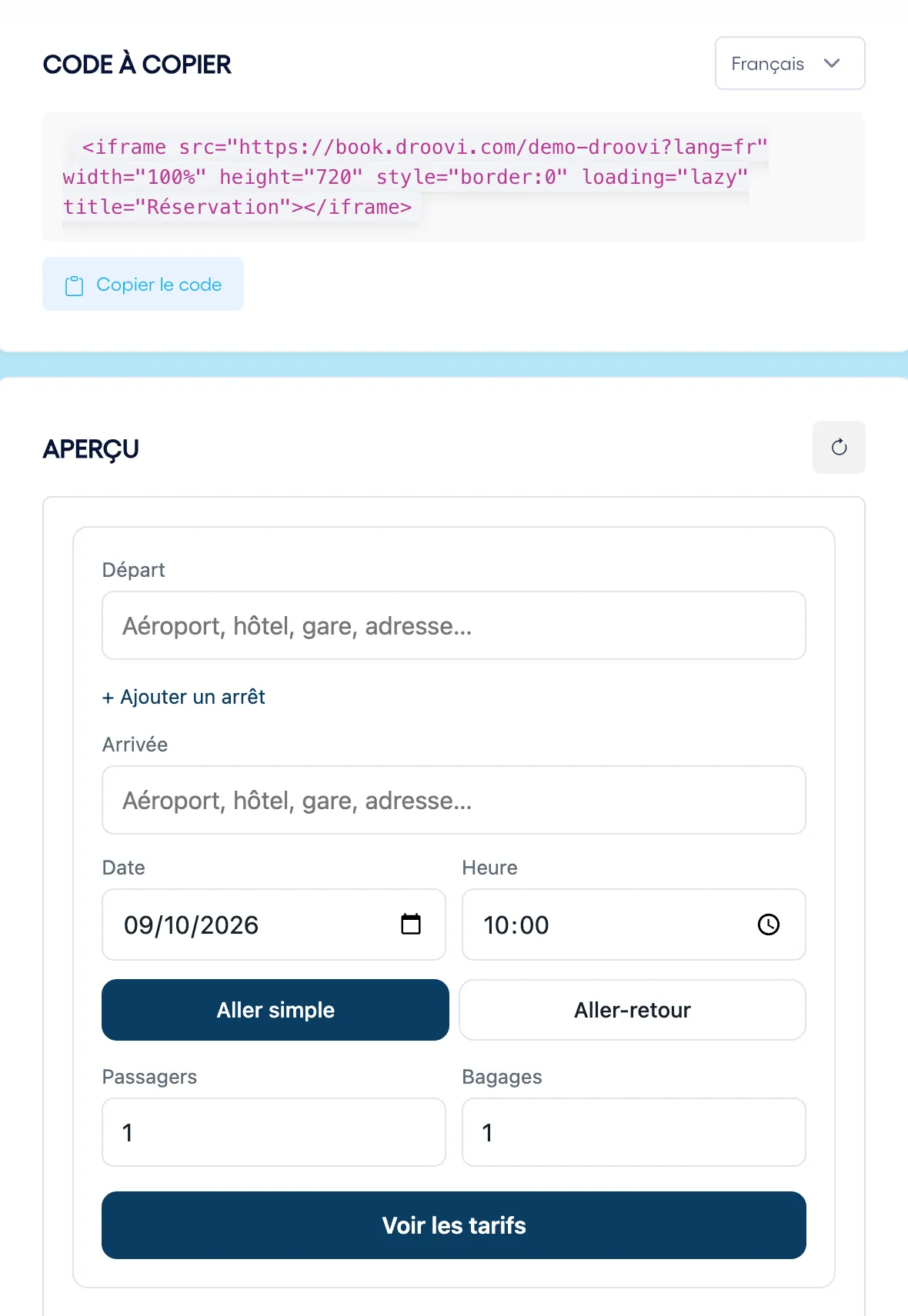
The code to copy and a live preview
The embed code is ready, in the language of your choice. Just below, the preview shows the widget exactly as it will appear on your site, with your settings.
- A single line of code to paste, nothing to install
- French, English or Spanish version of the widget
- Preview refreshed every time you change a setting
The passenger has peace of mind, and the ride is already in your schedule
Instant confirmation
- Price known before booking, no waiting for a quote
- Booking summary and ride reference on screen
- Confirmation email in the language they chose
- Payment on board or by card, depending on your settings
A ride ready to assign
- The ride is created in your Droovi account, no re-entry
- You get an email for every new booking
- Addresses, time, flight, passengers and luggage already filled in
- Dispatch, tracking and invoicing just like your other rides
On board or online, you decide
The payment method is set in the widget and can be changed at any time.
On board only
The client books without paying online and pays the driver at the end of the ride. The ride is created as unpaid, with "on board" as the payment method.
Online with Stripe
The client pays by card when booking, inside the widget, without leaving your site. The money goes to your own Stripe account and never passes through Droovi.
Client’s choice
The passenger chooses between paying now by card or paying on board. Handy if some of your clients prefer to pay the driver directly.
Online payment requires your Stripe keys, entered once in Settings > Online payment.
A widget built for chauffeur companies
A generic form knows nothing about your prices, your vehicles or your schedule. The Droovi widget uses the data already in your account.
Your prices, not a platform’s
The widget applies your Droovi rate cards. Change a price in your account and the widget shows the new one.
Zero commission on your rides
The widget is a flat monthly subscription. Whether you take 10 or 300 bookings a month, Droovi takes nothing from the ride price.
Nothing to re-enter
The booking becomes a complete Droovi ride, linked to the client of your choice and ready to assign to a driver.
Bookings on your terms
Minimum notice before pickup, vehicles filtered by number of passengers and pieces of luggage, and acceptance of your terms and conditions before confirming.
Three languages for airport clients
The widget is available in French, English and Spanish. The passenger receives their confirmation email in the language they used.
It only shows on your site
List your domains under "Allowed sites" and nobody can embed your widget on another website.
€50 excl. VAT per month, no commission
The booking widget is an add-on to your Droovi subscription. Its price does not depend on the number of bookings. At that price the booking doesn't stop at the form: the ride goes straight into your dispatch, the driver app and Droovi invoicing.
No commitment · unlimited bookings
- Widget hosted on book.droovi.com, in your colours
- Prices calculated from your rate cards
- Transfers and hourly hire
- Payment on board, via Stripe or at the client’s choice
- Rides created in your Droovi account
- Confirmation emails to the passenger and your company
- French, English and Spanish
Added to your Droovi subscription, from €19.90 excl. VAT/month.
Create my accountEverything about the chauffeur booking widget
How much does the booking widget cost?
€50 excl. VAT per month, with no commitment and no commission on rides, however many bookings you take. It comes on top of your Droovi subscription, available from €19.90 excl. VAT per month. The widget has no separate trial: the Droovi subscription comes with a 14-day free trial, no card required, and the widget is then switched on as an add-on.
How do I add the widget to my website?
In Droovi, open the Booking widget screen, set your options and click "Copy code". Paste that code into an HTML block on your site (WordPress, Wix, Webflow, Squarespace or a custom site). The widget appears right away, with nothing to install on your server.
Is there a WordPress plugin for chauffeur bookings?
No plugin needed: the Droovi widget goes in with one line of code. On WordPress, add a Custom HTML block (Gutenberg) or an HTML widget (Elementor) and paste the code. On Wix use Embed > Embed HTML, on Webflow the Embed element. No extension to update, no theme conflicts.
I don't have a website. What can I do?
The widget is designed for an existing site. If you don't have one, Droovi offers a ready-made chauffeur website delivered with the booking widget already in place. You can also share your widget's book.droovi.com address directly with your clients.
Where do bookings go?
Straight into your Droovi account, as a ride linked to the client you chose (for example "Website"). You will find it with your transfers, ready to assign to a driver.
Who is notified when a client books?
The passenger receives a confirmation email in the language they used on the widget. Your company also receives a new booking notification.
Who receives online payments?
You do. Payment goes through Stripe with your own keys, entered in Settings > Online payment. The money lands in your Stripe account and Droovi takes no commission.
Can I offer payment on board only?
Yes. You choose between payment on board only, online payment only, or both at the client's choice. You can change the setting at any time.
How are the displayed prices calculated?
From the rate cards you have set up in Droovi. Only vehicles with a price for the requested journey are offered. If no price matches, the widget shows the phone number you provided.
Can I stop clients booking at the last minute?
Yes, with the minimum notice setting. By default the widget refuses pickups less than 12 hours away, and you can set this notice in hours to suit how you work.
Which languages is the widget available in?
French, English and Spanish. You choose which languages are offered and the default one, and the code to copy exists in each of them.
Can someone copy my widget onto another website?
Not if you enter your domains under "Allowed sites": the widget will then refuse to load anywhere else. If the field is empty, it can be embedded on any site.
What happens after the booking
Ready-made chauffeur website
No website yet? We deliver a site under your brand, with the booking widget already built in.
Chauffeur dispatch software
Every booking from the widget can be assigned automatically to the right driver by AI.
Chauffeur invoicing software
Invoice your rides, your clients and your subcontractors from the same account.
Take your first online bookings this week
Create your Droovi account, turn on the widget and paste the code on your site. Would you rather do it with us? Book a demo and we will set it up together with your prices.